
Plugin Admin Dashboard

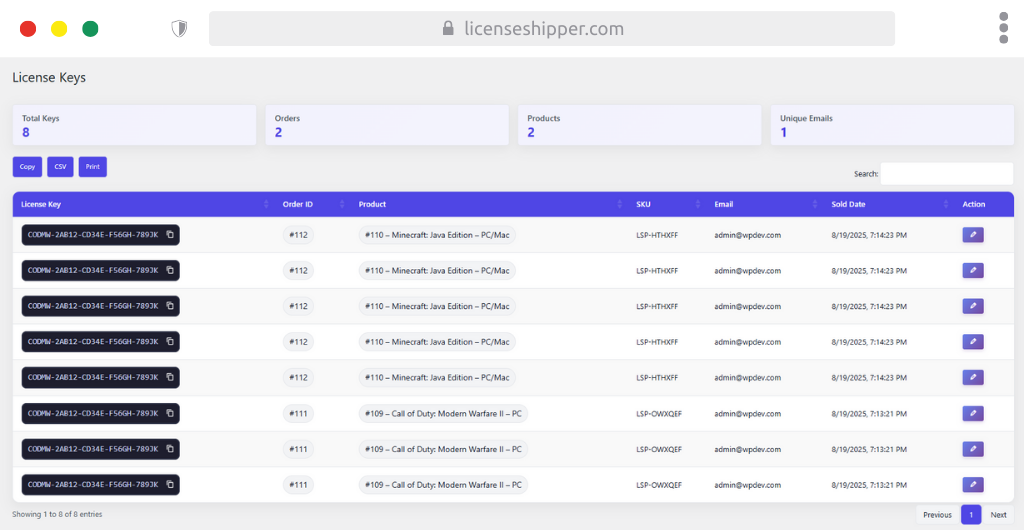
License Keys Dashboard – Quick Guide
The License Keys Dashboard provides an overview of all license keys sold, their related orders, and customer details. It helps track delivery and validate usage.
Summary Cards
- Total Keys – Total number of license keys recorded.
- Orders – Total orders linked to licenses.
- Products – Number of unique products with licenses sold.
- Unique Emails – Number of unique customers who received keys.
Table Columns
- License Key – The actual code delivered (partially masked for safety). Includes a copy button for quick copying.
- Order ID – Links each key to the related order.
- Product – The product tied to the license (e.g., Minecraft: Java Edition – PC/Mac).
- SKU – The product’s stock keeping unit.
- Email – The customer email who received the license.
- Sold Date – Timestamp of when the license was delivered.
- Action – ✏️ Edit option to adjust or correct a license record.
Export & Utilities
- Copy – Copy all table data.
- CSV – Export license key records to a CSV file.
- Print – Print license key records directly.
Tips
- Use the Search bar to quickly locate keys by product, SKU, or email.
- Regularly export CSV for backups or accounting.
- Always verify Order ID and Email when resolving support issues.
This dashboard acts as your license fulfillment record center, ensuring transparency and easy management of all distributed keys.