
Managing API

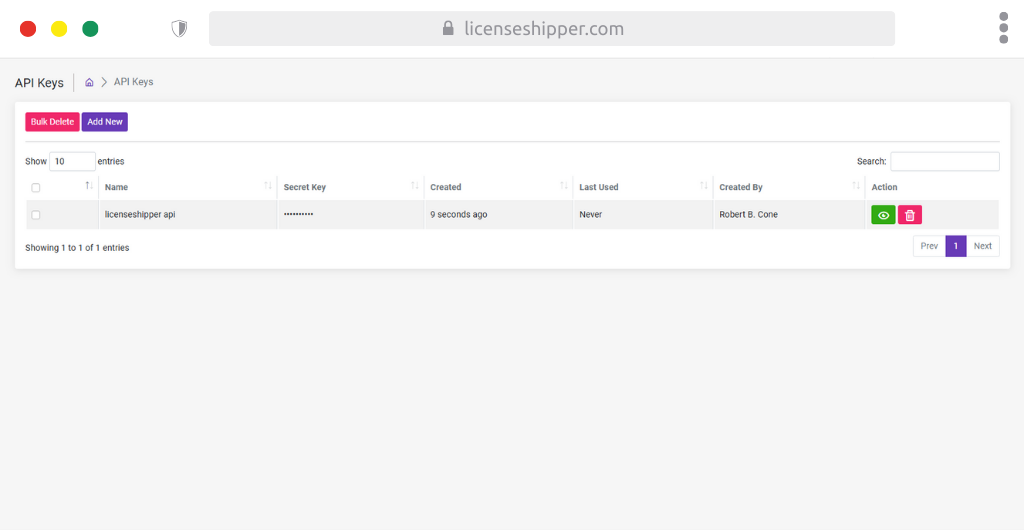
API Keys Page – Quick Guide
The API Keys Page manages secure access tokens for integrating LicenseShipper with external systems (e.g., WooCommerce, Shopify, or custom apps).
🔑 Main Features
1. Top Action Buttons
- Bulk Delete (Red): Remove multiple API keys at once.
- Add New (Purple): Create a new API key for integration.
2. API Keys Table Columns
- Name – Label for the API key (e.g., licenseshipper api).
- Secret Key – The actual API token (hidden by default).
- Created – When the key was generated.
- Last Used – Tracks the last time the key was used (shows Never if unused).
- Created By – The user who generated the key.
- Action – Quick controls:
- 👁️ View – Reveal the secret key.
- 🗑️ Delete – Remove the key.
3. Search & Navigation
- Search bar (top-right): Quickly locate an API key by name or creator.
- Pagination (bottom): Navigate between pages of keys if many exist.
✅ Tips
- Use a separate API key per integration (e.g., one for WooCommerce, one for Shopify).
- Rotate keys periodically for security.
- Delete unused keys to reduce security risks.
- Keep your Secret Key private – treat it like a password.
This page is your integration hub, allowing secure and trackable connections between LicenseShipper and other platforms.
API Key Details – Quick Guide
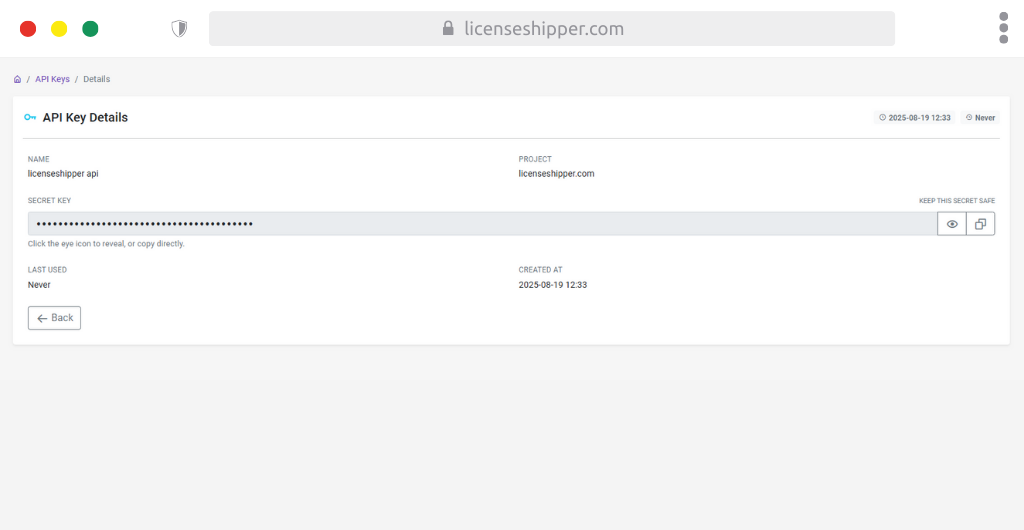
The API Key Details Page shows the full information of a specific API key. Use this page to copy, manage, and track the key.
Main Sections
Name
Label of the API key (e.g., licenseshipper api).
Project
Project or app linked to the key (e.g., licenseshipper.com).
Secret Key
The secure token used for API authentication. Hidden by default.
- 👁️ Eye icon: Reveal key.
- 📋 Copy icon: Copy key to clipboard.
- ⚠️ Keep this key safe; treat it like a password.
Created At
Date and time when the key was generated.
Last Used
Shows the last time this key was used. Displays Never if not yet used.
Actions
- Back button: Return to the API Keys list.
Tips
- Use this page to copy your API key for integration into external apps.
- Rotate or regenerate keys periodically for better security.
- Share keys only with trusted developers or systems.